
With WooCommerce Product Table, the process of creating product tables becomes very simple and requires no special skills. This tutorial will help you make your table more attractive with Borders & Row Striping.
Borders
You can set the Borders settings in the Product Table in “Settings-> Appearance”:
- None.You may not display the borders of the product table
- Cell . Adds border around all four sides of each cell.
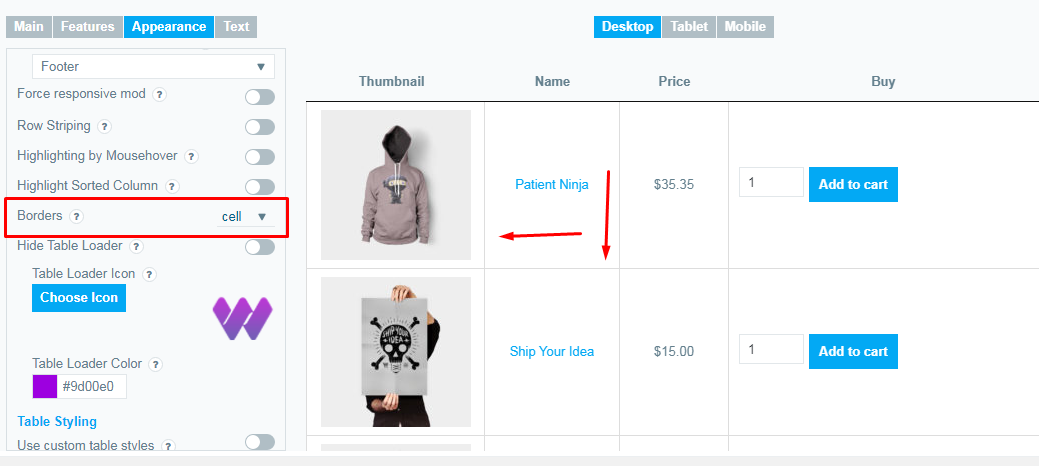
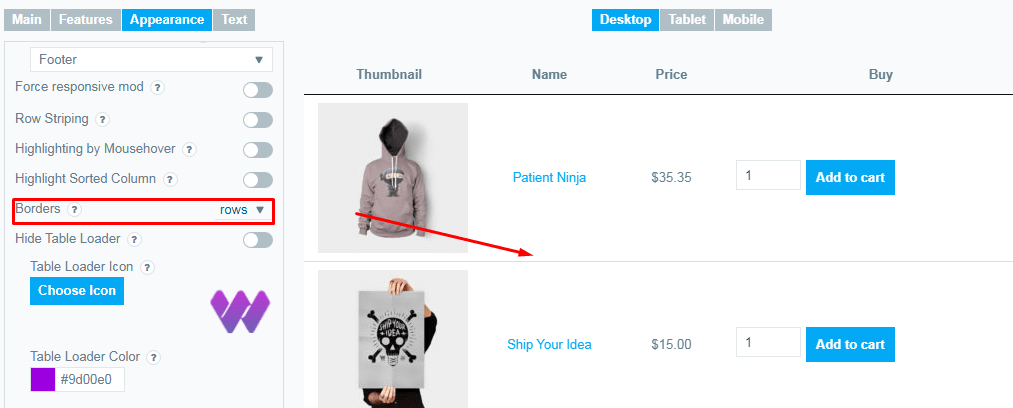
- Row – adds border only over and under each row. (i.e. only for the rows).
How Else Can I Highlight my Product Table?
Yes! You can enable selection when you hover and make viewing the table more convenient. And also enable the option when the currently sorted column is highlighted
Read this Highlight tutorial to learn more.
Can I Color my Product Table?
Of course! Thanks to our Pro version, you can create adaptive Product Sheets for selected items automatically, without any special skills, and give your stores the best styles.
Check out our Custom Table Styles and Design tutorial to learn more about it.
Have questions or have a suggestion about Borders & Row Striping ? Contact us and we will be happy to help you.