

Let’s be honest: keeping up with a blog can feel like a full-time job. First, there’s the brainstorming—what should you write about this week? Then comes the actual writing, editing, sourcing images, and finally, the dreaded task of scheduling posts and promoting them on social media. For small teams or solo bloggers, this process is exhausting.
But here’s the kicker—skipping your blog entirely isn’t a solution. In today’s digital-first world, a neglected blog is like an empty storefront. You’re missing out on organic traffic, potential leads, and the chance to build your brand’s credibility. Worse, your competitors (who are blogging consistently) are winning over the audience that could’ve been yours.
The reality is clear: to stay relevant and grow, you need fresh content regularly. But how do you pull that off without burning out or hiring an entire team of writers and schedulers?
There’s a smarter way. One that saves time, maximizes efficiency, and ensures your blog is always alive and kicking. Let’s talk about it.
Meet the Best Automatic Blog Writer and Auto Social Media Post Generator
Managing a blog and social media simultaneously can feel like a never-ending hustle. That’s exactly why the team at AIWU created their game-changing plugin: the AI Copilot – Content Generator for WordPress. This powerful tool doesn’t just automate your content creation—it gives you complete control over every detail.
So, what’s the deal with this plugin? Simply put, it’s built to make your life easier by leveraging OpenAI’s API for automatic blog writing and bulk content creation. Whether you’re running a personal blog, managing a corporate site, or juggling multiple social media platforms, this tool has you covered.
Why It’s a Game-Changer for WordPress Users
The AIWU plugin allows you to generate WordPress posts in bulk—thousands of articles at once! You can customize every aspect of the content, thanks to its Bulk Article Generation feature Even if you’re publishing hundreds or thousands of posts, you retain control over, use additional prompts, select and fully customize generated fields, such as:
- Article body: Choose from three different modes to suit your needs.
- Title: Craft compelling headlines that grab attention.
- Image generator: Automatically generate visuals for each post.
- Categories and tags: Organize your content with precision.
- Meta descriptions: Ensure SEO optimization right out of the gate.
- Author details: Customize attribution to match your brand’s tone.
- Scheduling: Publish immediately or set a randomized schedule for consistent updates.
It’s the ultimate content toolkit for bloggers, marketers, and businesses alike. But today, we’re diving into something even more exciting: how to fully automate your content marketing strategy with this plugin.
Fully Automating Your Content Marketing with Auto Content Creation
Let’s break down how AIWU’s Auto Content Creation for WordPress works in the simplest terms. Imagine having a steady stream of fresh, industry-relevant content delivered directly to your blog and social media platforms—all without lifting a finger. Sounds magical, right? That’s exactly what this feature offers. Here’s the big idea:
- RSS Feeds as the Trigger
The system starts by pulling fresh news and updates from your industry using an RSS feed. This feed acts as a pipeline, bringing in the latest and most relevant information straight to your WordPress dashboard. - The AIWU Magic
Once the content arrives, the plugin works its magic. With a little guidance from your content guidelines (like tone, style, or additional prompts), it processes the information and crafts it into polished SEO optimized blog posts. - Auto Blog Posts and Social Media Updates
Here’s where it gets even better. The plugin doesn’t just stop at blog posts—it automatically generates social media posts for platforms like LinkedIn, X (Twitter), Facebook, and Instagram. These posts include a link back to your newly created blog article, driving traffic to your site and ensuring your audience stays engaged across multiple channels.

This seamless process allows you to maintain a consistent online presence without spending hours managing content creation. It’s like having an invisible assistant keeping your blog and social media alive 24/7.
Example: Setting Up an AI News Scenario with Auto WordPress Post Scheduler
To better illustrate the power of AIWU’s Auto Content Creation for WordPress, let’s walk through a practical example: automating blog posts and social media updates about the latest developments in AI.
1. Configuring the Scenario
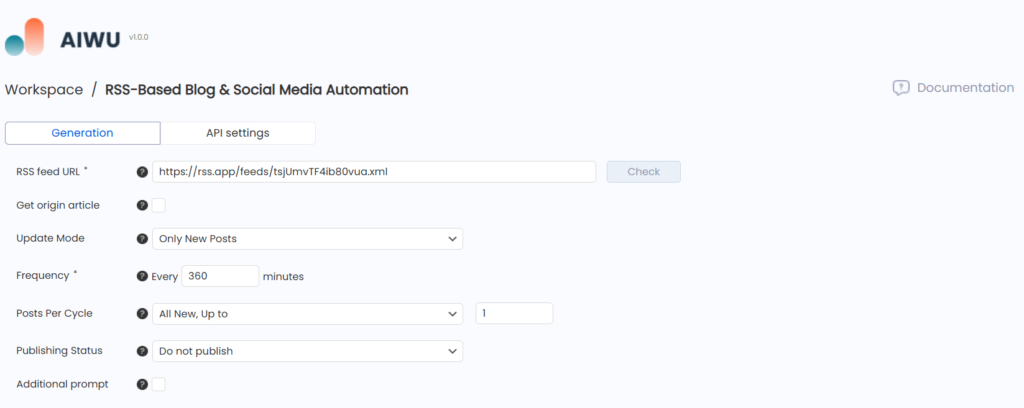
- RSS Feed Setup: Start by adding a reliable RSS feed that delivers fresh AI-related news (e.g., RSS feeds from tech news platforms like RSS APP, Wired or TechCrunch).
- Frequency: Set the plugin to check for new articles every 360 minutes (6 hours) to ensure you’re covering breaking news promptly.
- Posts Per Cycle: Define the limit—perhaps just one post per cycle to avoid overloading your blog.
2. Customizing the Content
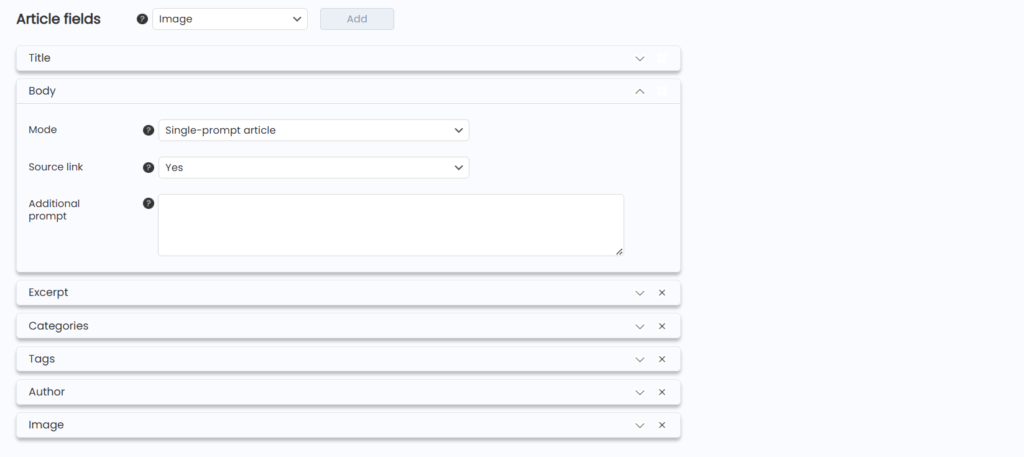
- Title and Body: Use the plugin’s Single-Prompt Article Mode to automatically create engaging blog posts. Add an optional additional prompt to ensure the generated content reflects your unique tone and style. Please use “Add Source” respecting copyright.
- Tags and Categories: Auto-assign tags like “Artificial Intelligence,” “AI News,” and “Tech Updates” to keep your content organized and SEO-friendly.
- Images: Let the plugin generate relevant images for each post automatically, keeping your blog visually appealin
- Etc
3. Auto WordPress Post Scheduler
- Use the Auto WordPress Post Scheduler to space out your blog updates. Set the posts to “Do not publish” mode if you prefer reviewing and approving each post or “Published” for a fully automated workflow.
4. Social Media Integration
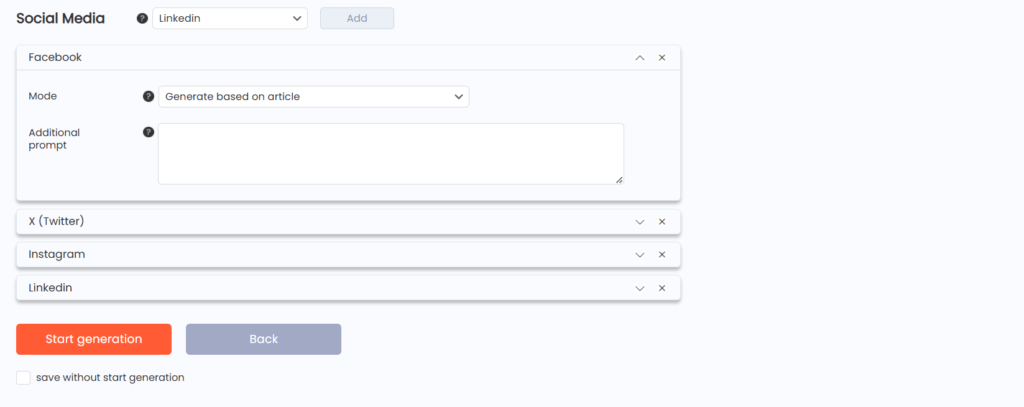
- The plugin doesn’t stop at your blog—it auto-generates social media posts for LinkedIn, X (Twitter), Facebook, and Instagram, complete with links back to your newly created blog articles. These posts are ready to go live the moment your article is published.
5. Real-Time Notifications and Tracking
- Approval Notifications: Enable notifications so you’re alerted each time new content is ready. Approve the draft with just one click or let the plugin publish it automatically.
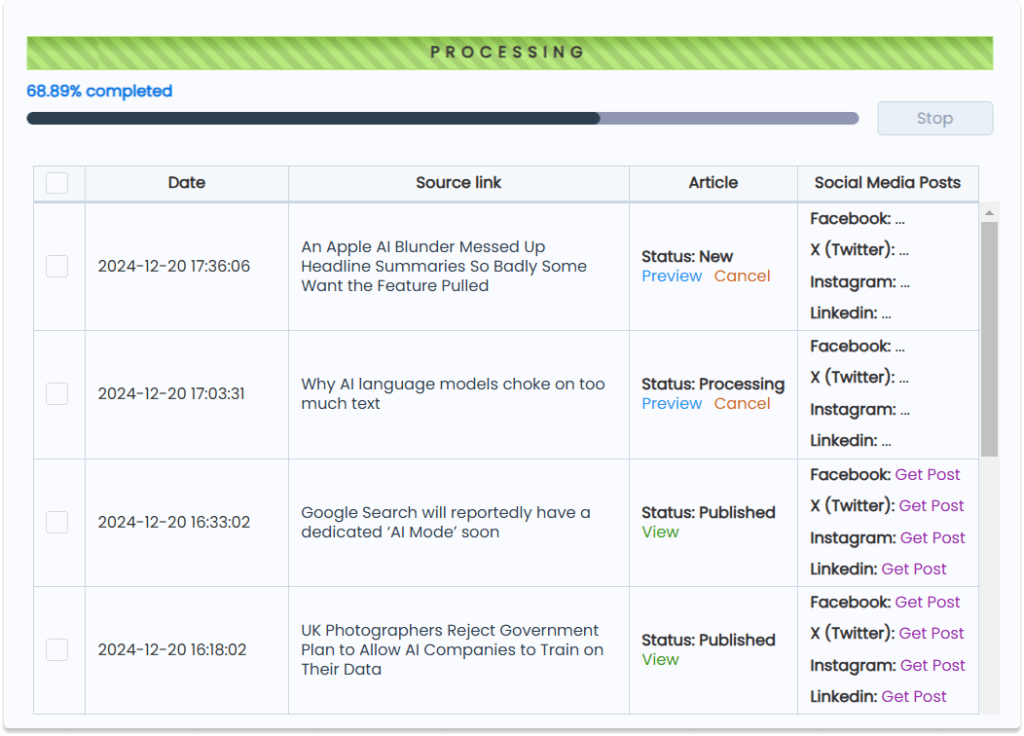
- Performance Tracking: Monitor the status of your posts in real time—whether they’re still processing, scheduled for publishing, or live on your blog. You’ll always know where things stand.
This streamlined process allows you to dominate your niche with consistent, high-quality content about AI or any other topic, all while saving countless hours. Whether you’re fully automating or prefer keeping some aspects manual, AIWU’s plugin adapts to your needs effortlessly.