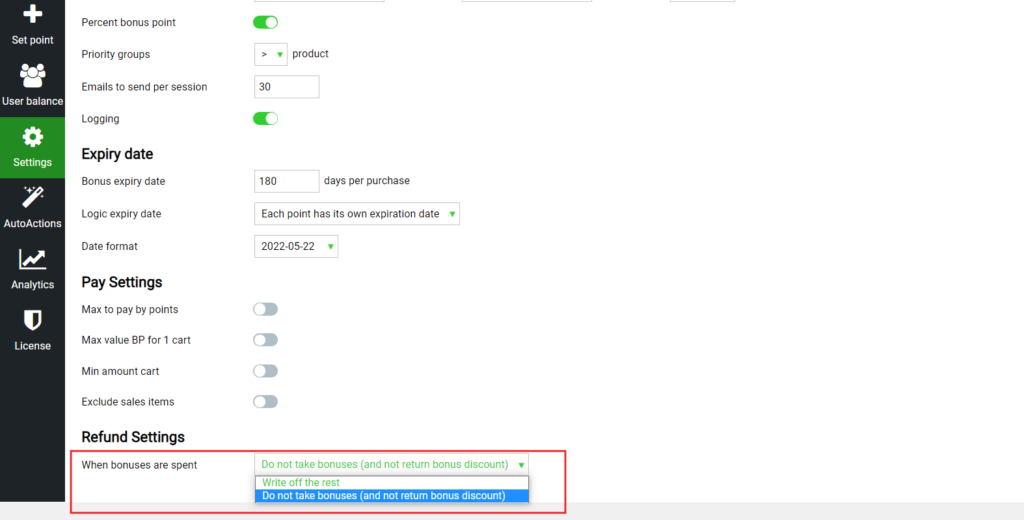
If at the time of returning the goods, the client does not have enough Bonuses on the Bonus account to write off the amount previously accrued for the purchase and spent by the client, then you have complete control over such situations. To do this, go to settings -> main -> Refund settings.
Here choose how exactly to proceed with the returns When rewards are spent
If Write off the rest is selected, the maximum possible number of bonuses will be written off.
If Do not take bonuses (and not return bonus discount) is selected, then the bonuses accrued for the returned goods will not be deducted under any circumstances when returning the goods.
Check out our documentation to learn more about other WooBeWoo Reward Points for Woocommerce options.
Also, if you have any questions, please contact usand we will be happy to help you.
What should you do next?
Thanks for reading till the end. Here are 4 ways we can help you grow:
Want to learn more?
Explore our full collection of How-To guides to master every feature and functionality.