

Beauty and cosmetics stores usually carry a lot of similar products.
Foundations come in many shades, skincare products target different skin types, and makeup brands release dozens of variations for the same item.
When everything appears in one long list, shoppers often feel lost.
They may know they want a moisturizer for oily skin or a lipstick in a specific shade, but finding it takes too long.
That’s where a Product Filter for WooCommerce Beauty Stores becomes important.
Clear filters help customers narrow things down quickly, so they spend less time searching and more time choosing the right product.
Keeping Beauty Products Easy to Explore
The WoobeWoo Product Filter helps beauty stores stay organized in a way that feels natural to shoppers.
Instead of showing every product at once, it lets customers shape the product list based on what matters to them.
Someone shopping for skincare doesn’t have to scroll past makeup.
Someone looking for a specific brand doesn’t need to open every product page.
This approach keeps your store calm and easy to browse, even when you sell hundreds of items.
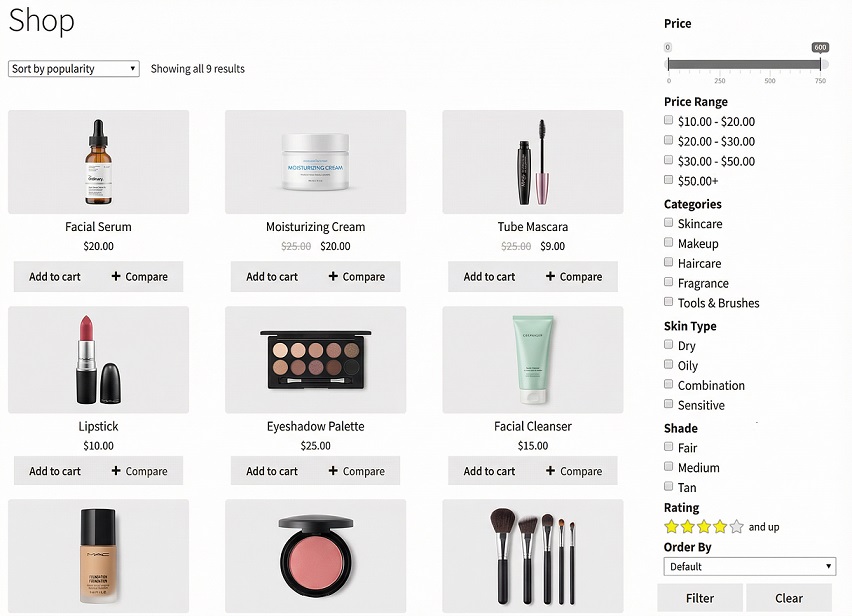
As a beauty store filter plugin, it works quietly in the background, adjusting results based on shopper choices without changing how your store looks or how you manage products.
For store owners, this means fewer confused visitors.
For shoppers, it simply feels easier to explore.
Filters Beauty Shoppers Actually Click
People shopping for beauty products usually have clear preferences.
They know what works for their skin, which brands they trust, or which shades they want to see.
The WoobeWoo Product Filter focuses on filters shoppers actually use:
-
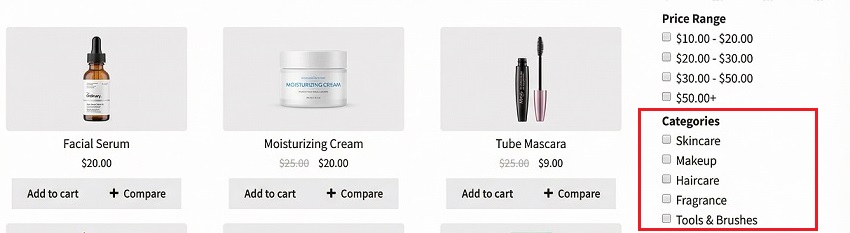
Filter by Product Type
Skincare, makeup, hair care, or tools. This helps customers reach the right section right away.
-
Filter by Skin Type or Use
Dry, oily, sensitive skin, anti-aging, daily care. This is especially helpful in skincare-focused shops.

-
Filter by Brand
Many shoppers stick with brands they already trust. This makes the plugin a reliable cosmetic shop product filter. -
Filter by Shade or Color
Useful for makeup stores offering foundations, lipsticks, and palettes. -
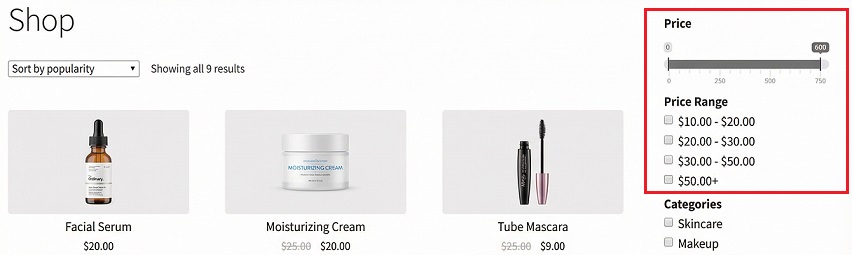
Filter by Price
A simple way for shoppers to stay within budget.
-
Instant Results (No Page Reloads)
Products update as filters are selected, keeping browsing smooth and fast.
Together, these tools act like a beauty catalog organizer, helping shoppers focus only on products that fit their needs instead of scrolling through everything.
From Setup to Shop Page in Minutes
Setting up filters for a beauty store is simpler than many people expect.
You don’t need technical skills or custom code.
Here’s how it works:
-
Get the plugin
Visit the WoobeWoo Product Filter page and add it to your store. The plugin file will be available in your account. -
Install and activate
In WordPress, go to Plugins → Add New, upload the file, then click Install and Activate. -
Create your first filter
Open the Product Filter menu and create what shoppers should filter by, such as skin type, brand, shade, or price. -
Place the filter in your shop
Show it on the shop page, category pages, or anywhere it fits best in your layout. -
Test it like a customer
Click through filters yourself to make sure everything feels clear. You can adjust settings anytime.
If you want a full walkthrough with examples, you’ll find it here:
How to add WooCommerce product filter to the shop?
Help Customers Find the Right Product Faster
Beauty shopping should feel confident, not confusing.
When customers can quickly narrow products by skin type, shade, brand, or price, they’re more likely to trust your store and finish their purchase.
The WoobeWoo Product Filter helps create that experience without changing how you run your business.
It keeps your catalog organized, your pages easy to browse, and your shoppers focused on what matters to them.
If you want your WooCommerce beauty store to feel easier to use from the first click, this is a practical place to start.
➡Download the plugin, set up your filters, and let customers find the right product faster.
Frequently Asked Questions
1. Can customers filter beauty products by skin type?
Yes, you can create filters for skin types such as oily, dry, sensitive, or combination using product attributes in WooCommerce.
2. Does the filter support color or shade filtering for makeup?
Yes, you can use color or attribute-based filters to help shoppers find specific shades for products like foundation, lipstick, or eyeshadow.
3. Will this work for stores with a large number of beauty products?
Yes, the plugin handles large catalogs well and uses AJAX filtering, so results update instantly without slowing down the store.
4. Can shoppers use more than one filter at the same time?
Yes, customers can combine filters such as skin type, brand, shade, and price to narrow results quickly.
5. Can I filter products by brand?
Yes, brand filtering is supported and is especially useful for returning customers who already know what they want.
6. Does the filter work with skincare and makeup products together?
Yes, you can create filters that work across all beauty categories or limit them to specific sections of your store.
7. Is any coding required to set up the filters?
No, all filters are created and managed through a simple dashboard inside WordPress.
8. Can I show filters on category pages as well as the shop page?
Yes, filters can be displayed on the main shop page, category pages, or custom product listings.
9. Will the filter affect my website’s loading speed?
No, filtering happens without reloading the page, keeping browsing smooth and fast.
10. Is there documentation to help with setup?
Yes, WoobeWoo provides step-by-step guides that explain installation, filter creation, and placement clearly.