

Running a pet store online usually means selling a lot of different items, food comes in many sizes and formulas.
Toys are made for different animals and ages, accessories vary by breed, weight, and purpose.
When everything is mixed together, shoppers can struggle to find what’s right for their pet.
That’s where a Product Filter for WooCommerce Pet Stores becomes important.
If your store sells products for dogs, cats, or other pets, a clear filter helps customers reach what they need faster, and that keeps them browsing instead of leaving.
A Smarter Way to Organize Pet Supplies Online
The WoobeWoo Product Filter gives your pet store a clear structure that shoppers can understand right away.
Instead of showing everything at once, it helps organize your products in a way that matches how people actually shop for their pets.
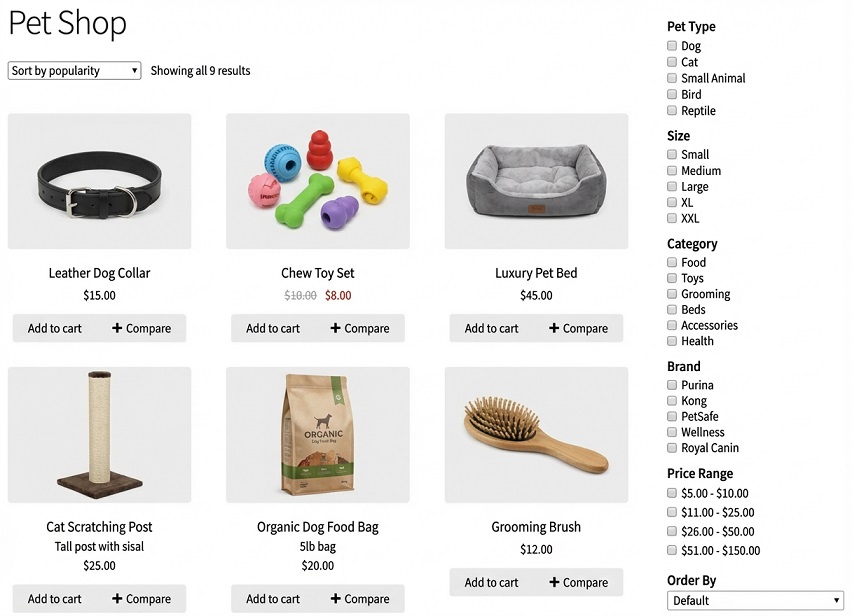
Someone looking for dog food doesn’t want to scroll past cat toys.
A customer shopping for a small puppy doesn’t want products made for large breeds.
This filter separates everything neatly, so each shopper sees options that make sense for them.
As a pet store filter plugin, it works quietly in the background, sorting your catalog based on the choices customers make.
It also acts as a flexible pet supplies filter, helping visitors move through food, toys, accessories, and care items without confusion.
If your store has many categories and variations, this approach keeps things clean and easy to browse, which makes shopping feel less like searching and more like finding.
Filters That Make Sense for Pet Stores
People shopping for pets usually know what they need.
They’re looking for food that fits a certain pet, toys made for a specific size, or accessories that match their animal’s needs.
The WoobeWoo Product Filter offers simple tools that help them get there faster.
-
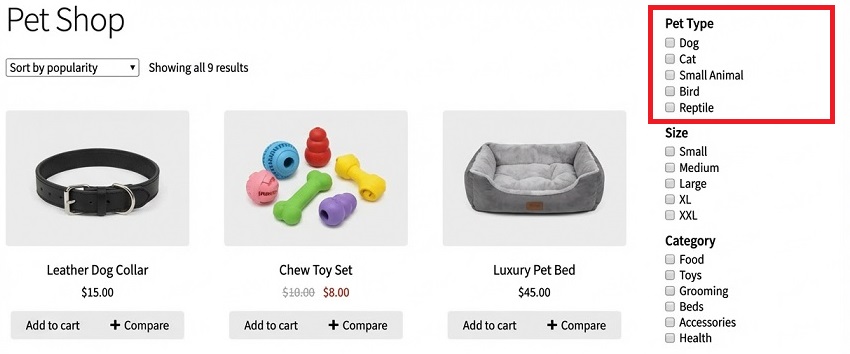
Filter by Pet Type
Dogs, cats, birds, fish, or small animals, shoppers can choose who they’re shopping for right away.
This is a key part of any good pet store filter plugin.
-
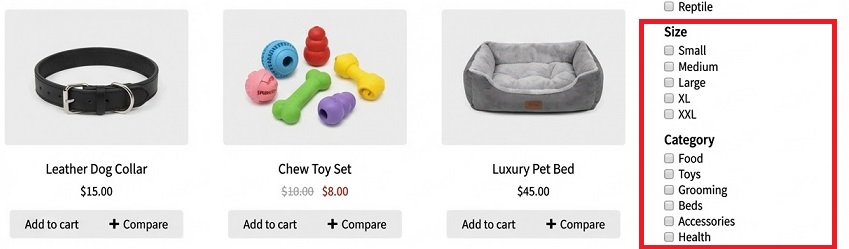
Filter by Size or Breed
Especially useful for food, collars, and toys. A small dog doesn’t need the same items as a large one. -
Filter by Category
Food, toys, grooming, beds, accessories, this keeps the catalog clean and easy to explore. A natural fit for a pet supplies filter.
-
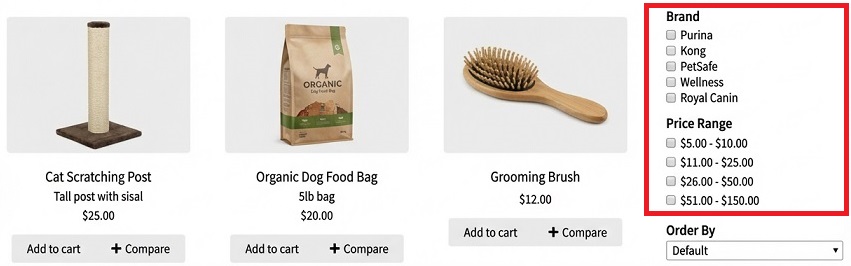
Filter by Brand
Many pet owners trust certain brands. This option helps them find those products quickly. -
Filter by Price
A simple price range lets shoppers stay within their budget without extra clicks.
-
Instant Results (No Page Reloads)
Products update immediately as filters are selected, which keeps browsing smooth.
This makes the WooCommerce pet catalog filter feel fast and responsive. -
Works Well with Large Catalogs
Even if your store has many items, the filter keeps everything organized.
That’s where it also works well as an animal supplies filter plugin.
Get Your Filters Running in Minutes
Setting up filters for your pet store is simpler than it sounds. You don’t need technical skills or extra tools, just a few clear steps, and you’re ready.
-
Get the plugin
Start by visiting the WoobeWoo Product Filter page and adding it to your store. Once that’s done, the plugin file will be available in your account. -
Install it in WordPress
In your WordPress dashboard, go to Plugins → Add New, upload the file, then click Install and Activate. That’s it for installation. -
Create your first filter
Open the Product Filter menu and click Add New. Create what shoppers should filter by, pet type, size, brand, price, or category. -
Place the filter on your shop page
You can show it in the sidebar, above the products, or inside your shop layout. Pick the spot that feels most natural for your store. -
Check it like a shopper would
Try selecting a few filters yourself. Make sure the results feel clear and helpful, you can adjust anything in seconds.
If you want a full walkthrough with screenshots and examples, you’ll find everything in the guide:
How to add WooCommerce product filter to the shop?
You can also watch this short, quick video:
Bring Filters to Your Store, Start Here
You can start using the Product Filter for WooCommerce Pet Stores today by adding it to your shop and setting up filters that match how your customers think.

Once it’s live, browsing feels smoother, and finding the right product becomes simple.
It’s a small change that makes a noticeable difference in how people experience your store, and it starts with downloading the plugin.
Frequently Asked Questions
1. Can I filter products by pet type (dogs, cats, etc.)?
Yes, the WoobeWoo Product Filter lets you create filters for pet type, so shoppers can quickly choose products for dogs, cats, birds, fish, or other animals.
2. Does the filter work with large pet supply catalogs?
Yes, the plugin handles large catalogs well and uses AJAX filtering, so results update instantly without slowing down your store.
3. Can customers filter by size or breed?
Yes, you can create filters based on size, weight, or breed-related attributes, which is useful for food, toys, collars, and beds.
4. Can I use the filter for pet food and accessories?
Absolutely, the plugin works as a pet supplies filter and supports food, toys, grooming products, beds, and accessories.
5. Will this work with my WooCommerce theme or page builder?
Yes, it is compatible with most WooCommerce themes and works well with Elementor, Gutenberg, and other builders.
6. Is coding required to set up the filters?
No coding is needed, all filters are created and managed through a simple dashboard.
7. Can I place filters on category pages?
Yes, you can display filters on the main shop page, category pages, or any custom product listing.
8. Does the filter slow down my website?
No, AJAX filtering updates results without reloading the page, keeping browsing fast and smooth.
9. Can shoppers combine multiple filters at once?
Yes, customers can filter by pet type, size, brand, price, and category at the same time.
10. Is there documentation to help me get started?
Yes, WoobeWoo provides step-by-step guides that explain installation, setup, and placement clearly.