
Some plugins create separate meta fields for Woocommerce products.
WooCommerce Product Filter fully supports Custom Meta Field filtering. With the plugin you can create a separate filter for any meta field and standard woocommerce scu, weight etc.
Filter by Custom Meta Field
After you\’ve created a Custom Meta Field, it\’s time to add a filter for these fields. To do this, open the WooCommerce Product Filter plugin and add an attribute filter in the Filters tab.
Next, click on the arrow on the attribute filter to open the options available for the attribute filter.
Now in the Select Attribute field, select Custom Meta Field.

Filter Option Settings
Here you can configure all the necessary options for the filter, all changes will be displayed in the preview.
You can configure the following options:
Custom meta-field.Here you can enter a custom name for the meta field.
For example, to display a sale price field, you would enter _Sale_price . In the same way, you can display any fields here.
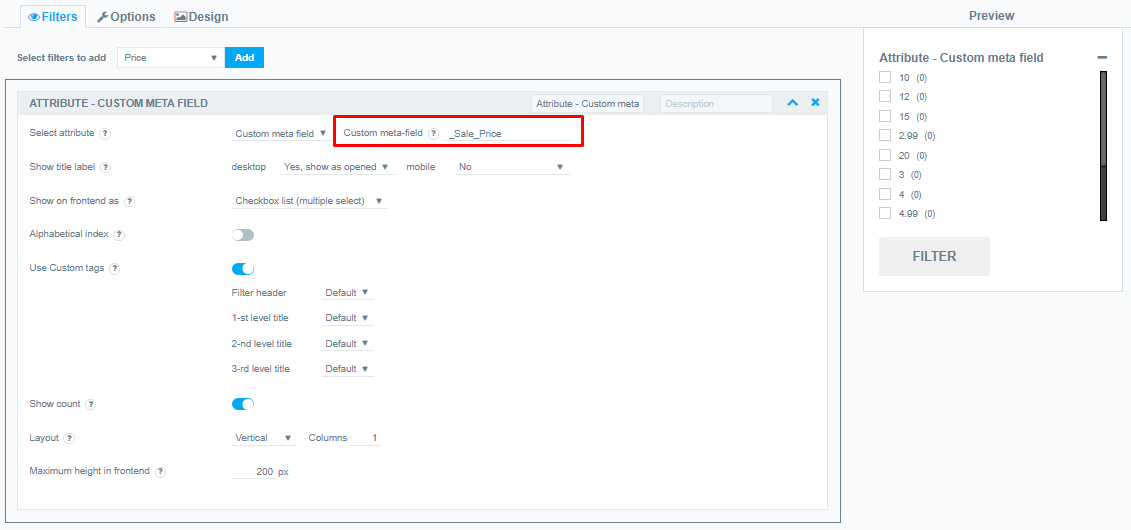
Show title label. Show title label with open/close filter functionality. Be carefull when show it as close with Hide filter by title click filter oprionality. In such case users do not see filter content
Show on frontend as. Depending on whether you need one or several attributes to be available at the same time, show attributes list as checkbox or dropdown. Attention! Slider type work only with numeric titles of attributes :
- Checkbox list
- Dropdown
- Multiple Dropdown
- Colors
- Text
- Buttons . If you select the buttons, then you can fully customize their design.
- Switch
- Slider. Attention! Slider type work only with numeric titles of attributes
Alphabetical index. Show Alphabetical index.
Use Custom tags. Choose tags for filter titles. Any settings you leave blank will default .
Show count. Show count display the number of products that have the appropriate parameter
Layout. Select a vertical or horizontal layout and set the count of columns .
Maximum height in frontend. Set maximum displayed height in frontend
Check out our documentation to learn more about other WooCommerce Product Filter options.
Also, if you have any questions, please contact us and we will be happy to help you.