
Thanks to the extensive functionality of the WooCommerce Product Filter plugin, you can customize almost every Product Filter option to suit your store\’s individual interface.
So, for example, if your product filter, after filtering ajax, has differences in the styles of the product list, pagination, or invoice block, then we recommend using the Force theme templates option. And this tutorial will help you understand this option.
Force theme templates
So, as we said above, if after ajax filtering there are differences in the styles of the product list, pagination, or invoice block, then enable this option.
You can enable and configure this option in the settings of the selected product filter.
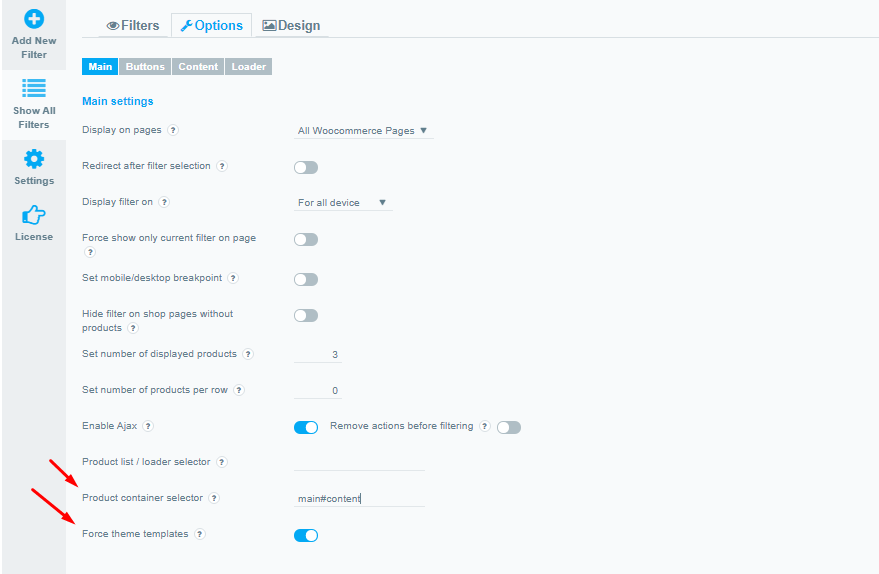
To do this, select the product filter you need-> Options->Main-> Force theme templates.
Product container selector
Important! For Force theme templates option to work correctly, we recommend filling in the Product container selector option.
To do this, select the product filter you need-> Options->Main-> Product container selector.
The main task of this option is to specify which page block to replace with a new one during filtering.
-for example, sometimes the page may contain several .products blocks, but it would be necessary to load the filtering result only into one of them.
-or you have a theme for this block in a completely different class – then the filter cannot find at all where to display what you have filtered.
After filling out this option, if there are multiple product shortcodes on the page, you can add a container selector that will limit the effect of this filter to only within it
Check out our documentation to learn more about other WooCommerce Product Filter options.
Also, if you have any questions, please contact us and we will be happy to help you.