Introduction

WooCommerce Filter Documentation

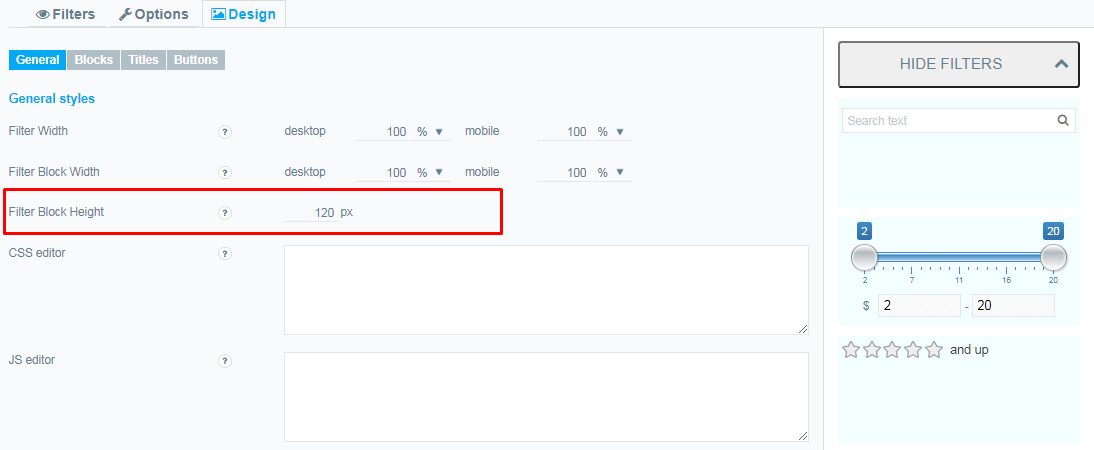
Filter Block Height

Thanks to the excellent  functionality of WooCommerce products filter, you can easily control the height of the filter block.
And immediately look at the changes in the preview

Filter Block Height

Here you can set the height in pixels. If not filled, then the height is calculated automatically based on the content of the filter. Please note that if the value of the Maximum height in frontend of the filter is greater than the specified value, some data may be hidden
Filter


Check out our Filter and block Width article to improve the look of your filter and the entire store.

What should you do next?

Thanks for reading till the end. Here are 4 ways we can help you grow:

Want to learn more?

Explore our full collection of How-To guides to master every feature and functionality.

Check out How-To Guides →

Looking to grow your store?

Browse our WooCommerce plugins to discover tools that can improve performance and boost your sales.

Browse WooCommerce Plugins →

Curious about related topics?

Visit our blog for more tutorials, expert insights, and the latest trends in e-commerce.

Visit Our Blog →

Still confused about this topic?

Submit your question or contact our support team directly. We are here to help!

Contact Support Team →

Latest Articles

Shopping Cart