
Product Filter Accordion is essentially the same WooCommerce product filter, but each filter element is rolled by default and appears only after clicking on the drop-down list icon or title.
This is very convenient, especially for displaying large filters or filtering on mobile devices.
By using the WooCommerce Product Filter by WoobeWoo, you will have a significant advantage over the classic filtering view.
Today there are practically no plugins on the WordPress market that provide such a simple Product Filter Accordion customization because what you need to do is just click on the option and you do not need to apply any code.
You can install the Accordion for mobile devices, or desktop, or for all devices at once, and also configure how it will be reflected when the page is first loaded in the opened or closed position.

How to create Product Filter Accordion by WooBeWoo?
When you use WooCommerce Product Filter by WooBeWoo, absolutely any customization becomes a pleasure of ease of customization.
After all, the most difficult thing that you have to do is to decide which filters to display in the form of an accordion, and this is very important, as you may have noticed in the previous two paragraphs of the article.
So, you have installed and activated the WooCommerce Product Filter plugin by WooBeWoo, then:
- Click “Create filter”, or “edit an existing one”.
- Add all the filtering elements you need, such as text search, filters by category, attribute, price, and others.
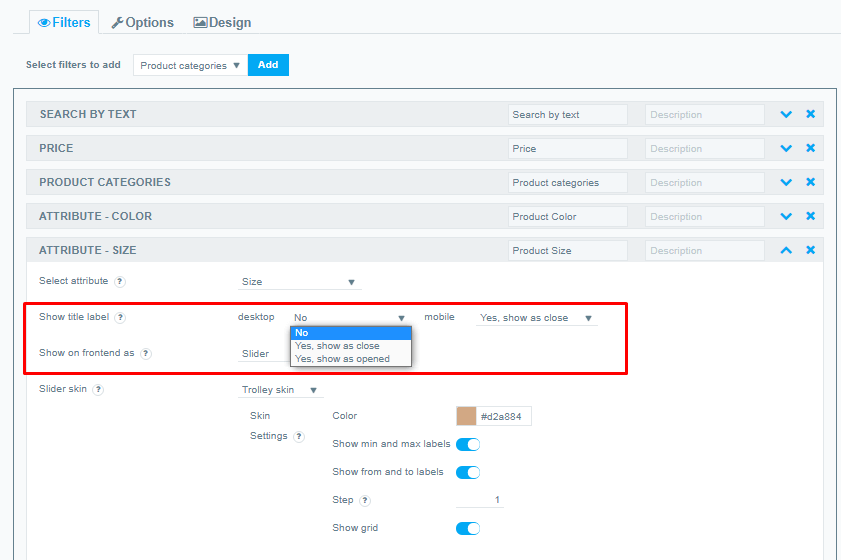
- Next, open the drop-down list with options for the required filters.
- In the “Show title label” field, select individually displayed on mobile and desktop devices.
desktop (No; Yes, show as close; Yes show as opened)
mobile (No; Yes, show as close; Yes show as opened
Still, have any questions? Read our detailed documentation or contact us and we will be glad to help you.