
WooCommerce Product Filter is a plugin that allows you to increase the conversion of your store website and create the most comfortable shopping conditions for your customers.
The plugin gives you the ability to customize almost every option and element of your product filter. For example, a very frequently asked question from users of the Product Filter plugin Can filter results be paginated? Of course it is possible, and this tutorial will help you familiarize yourself with this option.
Paginate Filter Results
For starters, understand that in general pagination is a feature of your theme, so you should look for its settings there.
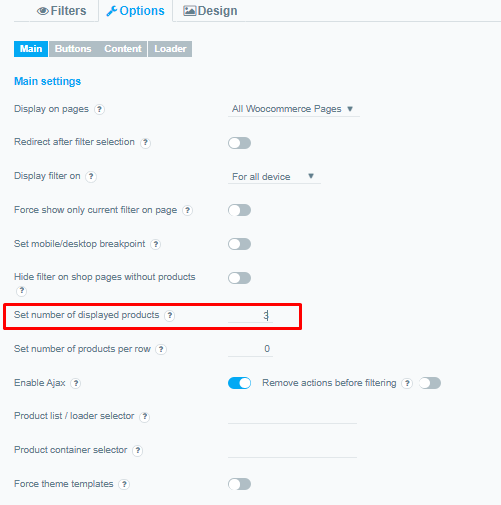
Still, for most WordPress themes, the Set number of displayed products option is ideal. This option allows you to specify the number of products to display on the page, i.e. all products will be automatically paginated into search results pages according to the specified number of products for one page
In order to configure this option, you just need to open the editing of the filter you need, go to Options> Main and in the Set number of displayed products option, specify the desired number of products
Now, on the front-end of your store, when users set a filtering request, the search results will be paginated according to the specified number of products.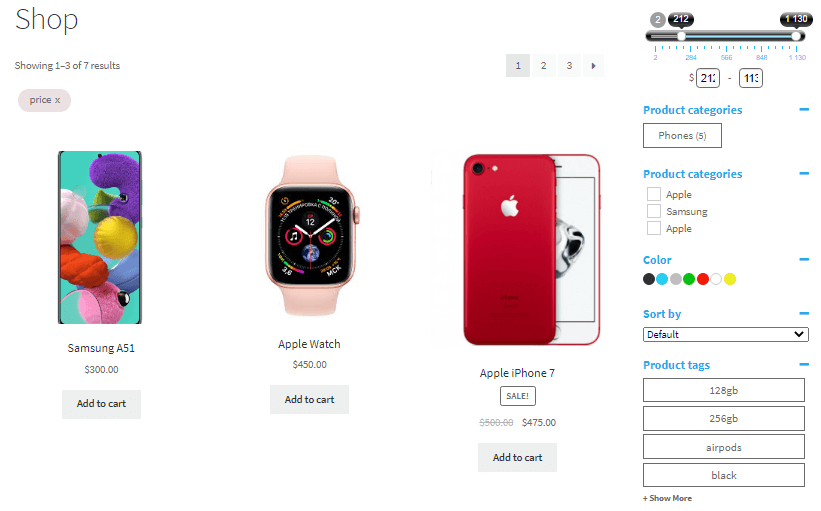
Check out our documentation to learn more about other WooCommerce Product Filter options.
Also, if you have any questions, please contact us and we will be happy to help you.