
Some of our users have encountered a problem: when filtering on the category page, all store products are displayed in the filtering results, and not just the products of the current category.
Why does this problem occur? The possible causes of this problem and how to solve them are listed below:
- The Always Filtering By All Products option is enabled. One of the possible reasons for this behavior may be the enabled Always Filtering By All Products option, which takes into account filtering for all store products, no matter what page the filtering occurs on. Just disable this option and only the products of the current category page will be displayed.

- Custom category page.. Another possible reason for this behavior could be when you have inserted products on a custom page (page not provided by woocommerce). In this case, for the category filter, you must specify a specific category, the products of which should be taken into account when filtering.
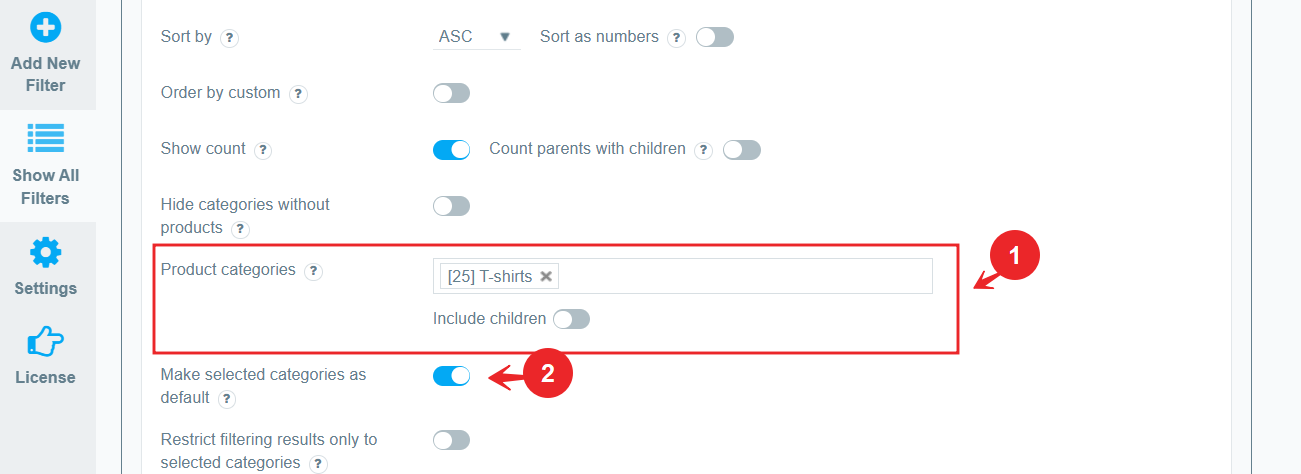
To do this, go to the category filter and select the appropriate category in the Product categories option. After that, enable the Make selected categories as default option, this will include only products of the specified category in the filtering results.
Now, on the category page, only the results of filtering by the current category will be displayed.