
We’re glad to welcome you to the world of WooBeWoo plugins, and create this tutorial to help you easily get started to use Product Table WooCommerce by following a couple of steps.
WooCommerce based
WooCommerce Product Table requires WooCommerce. Please make sure you have installed and activated the WooCommerce plugin before installing Product Table
The plugin uses the product data already created with WooCommerce (WooCommerce > Settings > Products ). This means that you can add products to WooCommerce manually or import them using a CSV/XML import, and they will be displayed in the product table.
So, after you have created all the products necessary for your store, it’s time to move on to installing the Product Table plugin.
Installation Product Table
- In the left panel of WordPress, click Plugins > Add New.
- Search for “WooCommerce Product Table by WooBeWoo” and click “Install”. When the installation is completed, click “Activate Plugin”. You will see a new plugin, ready to work in the admin menu.

To install the PRO version of the plugin follow the next steps:
- A download zip archive with PRO version
- Navigate to Plugins > Add New > Upload the archive > Activate Plugin.
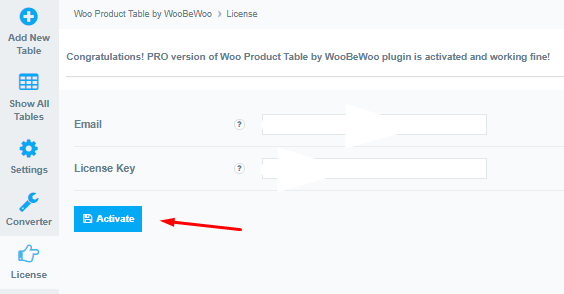
- After activation of the PRO version, you need to enter the license key.
- Go to the plugin in the WordPress navigation menu.
- Click the License tab on the left navigation menu of the plugin.
-
Enter your email and license key. - Click the Activate button.
Create a new table
Now, let’s go ahead and create our first table.Well, you are now ready to create your first product table.