
Having problems with the loading speed of your spreadsheet due to a large number of products in stores?
The lazy load option will help your product table pages load much faster.
Get the WooCommerce Product Table plugin and use the lazy load option now.
What is lazy loading?
Lazy loading is an option that allows you to load your products for each page separately, because. initially, the Product Table plugin will load all your products on all pages at the same time.
If you have more products than can fit on one result page (for example, you have 100 products and 10 rows per page are displayed), then 10 pages will be generated with pagination links below the table. However, all products on all pages are loaded at the same time.
Why do I need the lazy loading option?
If you display products in a table in a standard way, this can lead to a loss in the performance of your website\’s website and, as a result, a loss in conversion, since all relevant products are retrieved from the database and then formatted by the plugin. This can result in slower page loads and – for very large product databases – it can even lead to a website crash, server, or database error when trying to load a table.
If you have a lot of products, you can enable the lazy load to avoid performance issues.
How to enable lazy loading?
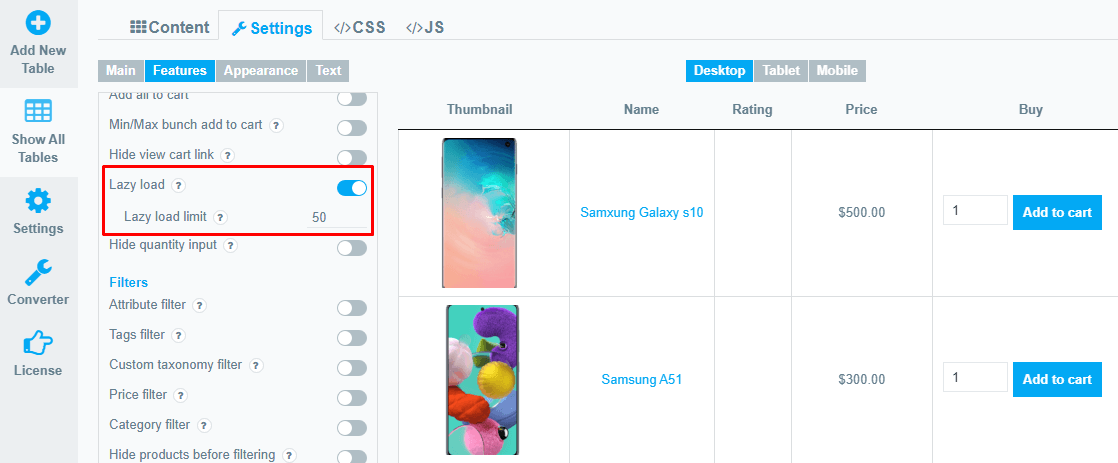
You can easily enable this option by going to WooCommerce Product Plugin Table -> Settings -> Features -> Enable Lazy load.
Moreover, you can set the number of lines to display in one lazy load. To do this, specify the required quantity in the Lazy load limit field
Still, have questions? Read our detailed documentation or Contact us and we will be happy to help you.