Introduction

WooCommerce Product Tables

Show the first variation as default

WooCommerce Product Table allows to display variable products and make all necessary settings for their better representation. 

One of the settings is to display the first variation as selected.

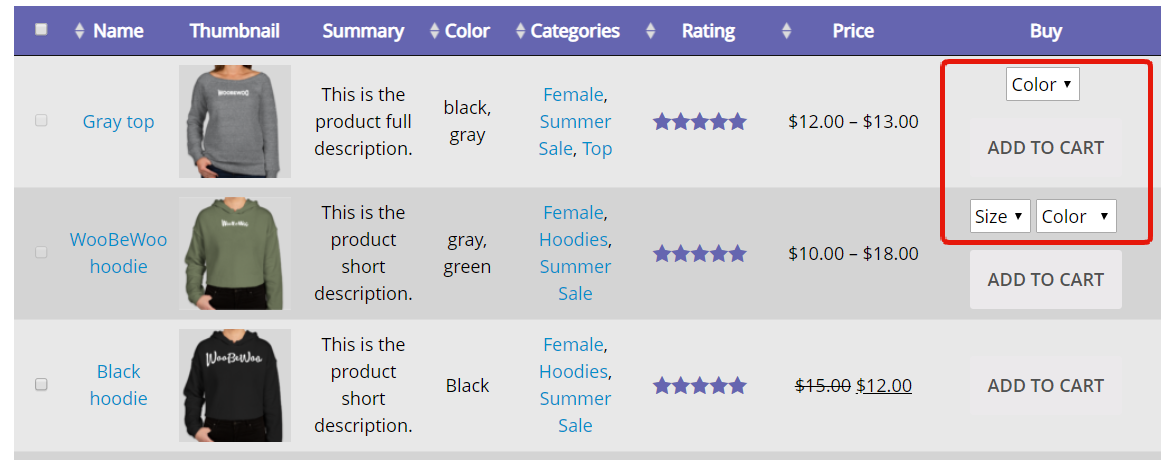
By default, products are displaying with a drop-down list of parameters to make the users select:
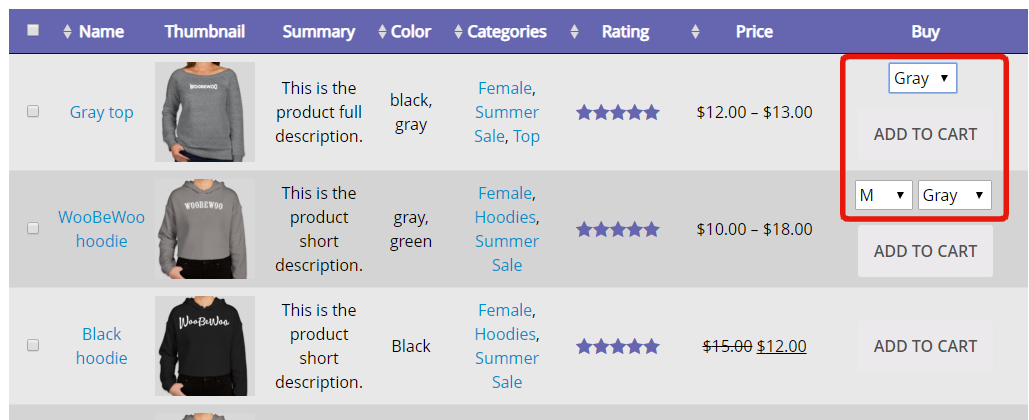
If you enable Show first variation as default – the first variation will be selected straight away.
What should you do next?

Thanks for reading till the end. Here are 4 ways we can help you grow:

Want to learn more?

Explore our full collection of How-To guides to master every feature and functionality.

Check out How-To Guides →

Looking to grow your store?

Browse our WooCommerce plugins to discover tools that can improve performance and boost your sales.

Browse WooCommerce Plugins →

Curious about related topics?

Visit our blog for more tutorials, expert insights, and the latest trends in e-commerce.

Visit Our Blog →

Still confused about this topic?

Submit your question or contact our support team directly. We are here to help!

Contact Support Team →

Latest Articles

Shopping Cart