
WooCommerce Product Table comes with many options to select products that are included or excluded from the table.this tutorial will help you learn how to display tags and use a tag filter.
Tags are text labels that will allow online store customers to quickly find all products thematically related to each other.
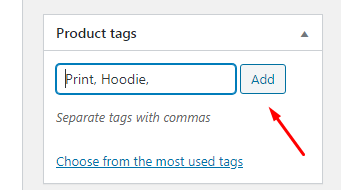
How Can I Create Tags?
The Tags option allows you to display products based on their tags. You can find and create it under Products> Tags.

As with categories, you can use a single tag or multiple tags, and also use commas or a plus sign to control logic. The use of commas means “products with this tag OR this tag”, while the use of the plus sign (+) means “products with this tag AND this tag”. You cannot mix and match commas and pluses – you must use one or the other.
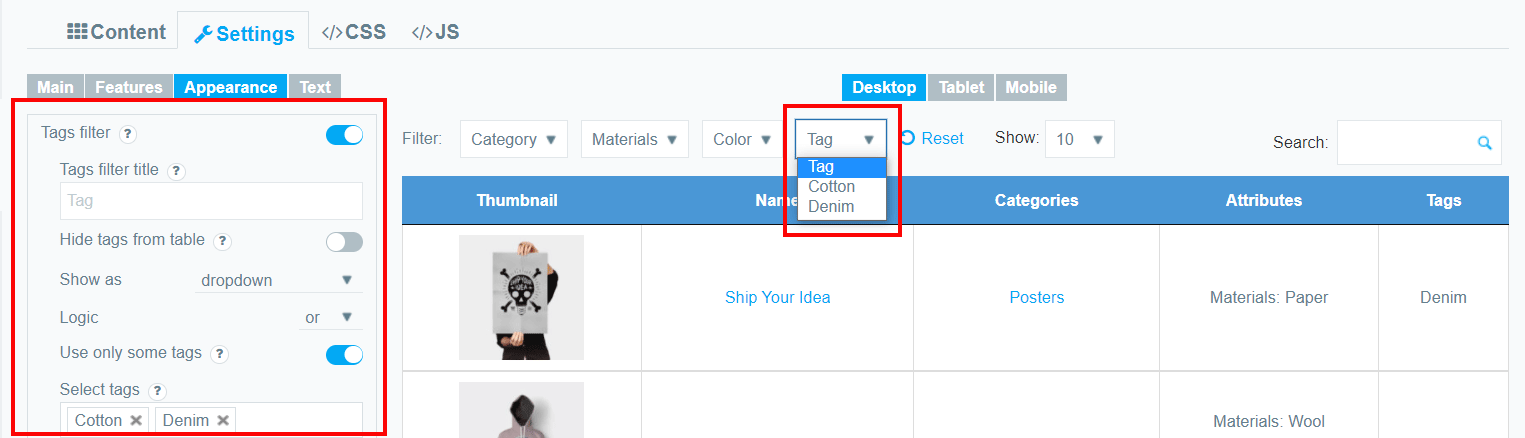
Tags Filter Settings
Tags Filter Title.Display as a default option of dropdown tags filter.
Hide Searching Tags from Table .Hide tags column and keep the filter to display. You don’t need to add Tags as a column to make filter available. If you will add Tags as a column manually, it will not be hidden even if “Hide tags from table” is enabled.
Show as: dropdown of multiselect dropdown (If you have chosen Multiselect Dropdownyou can enable Logic.Select the filtering conditions Or or And)
Use only some tags .Show only selected tags in the filter. If you have selected this option you can Select Tags to filtering(For ex. Cotton,Denim,etc).
Multiselect for Filters
Try filtering by several parameters at once. Read this article to find out more about it.